get started
Quickstart
The whole path, end to end: a file from your machine becomes a translated file, reviewed by people, delivered.
Eleven steps, each with the calls to make in cURL or Python. Core concepts explains the objects they create.
The full flow
SETUP        1  Authenticate
             2  Create the project        DRAFT
             3  Upload a file
             4  Create work units         one per workflow × locale
             5  Wait for the file to be prepared

MACHINE      6  Approve                   pre-translation starts
             7  Wait for pre-translation

PEOPLE       8  Assign the tasks
             9  Track progress
            10  Deliver                   DELIVERED

DELIVERY    11  Download
Steps 1–7 are yours alone. Step 8 onward you share with the people doing the work.
Step 1 · Authenticate
You need an access key and secret, issued for the API and separate from the password you sign in with (see Authentication). Keep them and the host in your environment:
export WXRKS_HOST="https://app.wxrks.com"
export WXRKS_ACCESS_KEY="your-access-key"
export WXRKS_SECRET="your-secret"WXRKS_TOKEN=$(curl -sS -D - -o /dev/null \
-X POST "$WXRKS_HOST/api/v3/auth" \
-H 'Content-Type: application/json' \
-d "{\"accessKey\":\"$WXRKS_ACCESS_KEY\",\"secret\":\"$WXRKS_SECRET\"}" \
| grep -i '^x-auth-token:' | sed 's/^[^:]*: //' | tr -d '\r')import os, requests
host = os.environ["WXRKS_HOST"]
r = requests.post(f"{host}/api/v3/auth", json={
"accessKey": os.environ["WXRKS_ACCESS_KEY"],
"secret": os.environ["WXRKS_SECRET"],
})
r.raise_for_status()
token = r.headers["X-AUTH-TOKEN"] # not r.json()
s = requests.Session()
s.headers["X-AUTH-TOKEN"] = tokenReference: POST /api/v3/auth
Look in the headers, not the body. The reply has an empty body: the token comes back in a header called
X-AUTH-TOKEN. If your tool only shows you the body, it will look like nothing happened.The token lasts 10 days by default. Save it and reuse it; there is no need to log in again before every call.
Step 2 · Create the project
Every project is created under an org unit: a department, team or client account in your organization. The org unit decides the currency, the price list and how much the platform automates, so it is the one thing to pick before you start.
GET /api/v3/client lists yours; the API says client where the interface says org unit.
export ORG_UNIT="57c8d061-dc9f-4047-817c-eb6f97101020"

PROJECT=$(curl -sS -X POST "$WXRKS_HOST/api/v3/project?inferDefaultSettings=true" \
  -H "X-AUTH-TOKEN: $WXRKS_TOKEN" -H 'Content-Type: application/json' \
  -d "{
    \"reference\": \"QuickStart API Guide\",
    \"orgUnitUUID\": \"$ORG_UNIT\",
    \"sourceLocale\": \"en_us\"
  }" | python3 -c 'import sys,json; print(json.load(sys.stdin)["uuid"])')
org_unit = os.environ["ORG_UNIT"]
project = s.post(f"{host}/api/v3/project",
params={"inferDefaultSettings": "true"},
json={"reference": "QuickStart API Guide",
"orgUnitUUID": org_unit,
"sourceLocale": "en_us"}).json()
project_uuid = project["uuid"]Reference: POST /api/v3/project
Learn more: Project's translation settings
What you send:
| Field | What it is |
|---|---|
orgUnitUUID | Required. The org unit the project belongs to; its settings become the project's. From GET /api/v3/client. |
sourceLocale | Required. The language the source files are in, as xx_yy (en_us, pt_br). Fixed once set. |
reference | Your own label for the project. The platform generates name separately. |
contactUUID | A user on the client side, shown as the project contact. |
tags | Free-form strings, usable later as filters on GET /api/v3/project. |
currency, timezone | Override the org unit defaults. Omit to inherit. |
What comes back:
{
  "uuid": "891390fe-76fc-440a-b19a-fbe574aac3a2",
  "name": "B-26264-53563-49BA",
  "status": "DRAFT",
  "sourceLocale": "en_us",
  "targetLocales": []
}| Field | What it is |
|---|---|
uuid | The project id. Every later call needs it. |
name | Generated by the platform: the code people see in the app. |
status | Always DRAFT at creation. |
targetLocales | Empty until work units exist (step 4). |
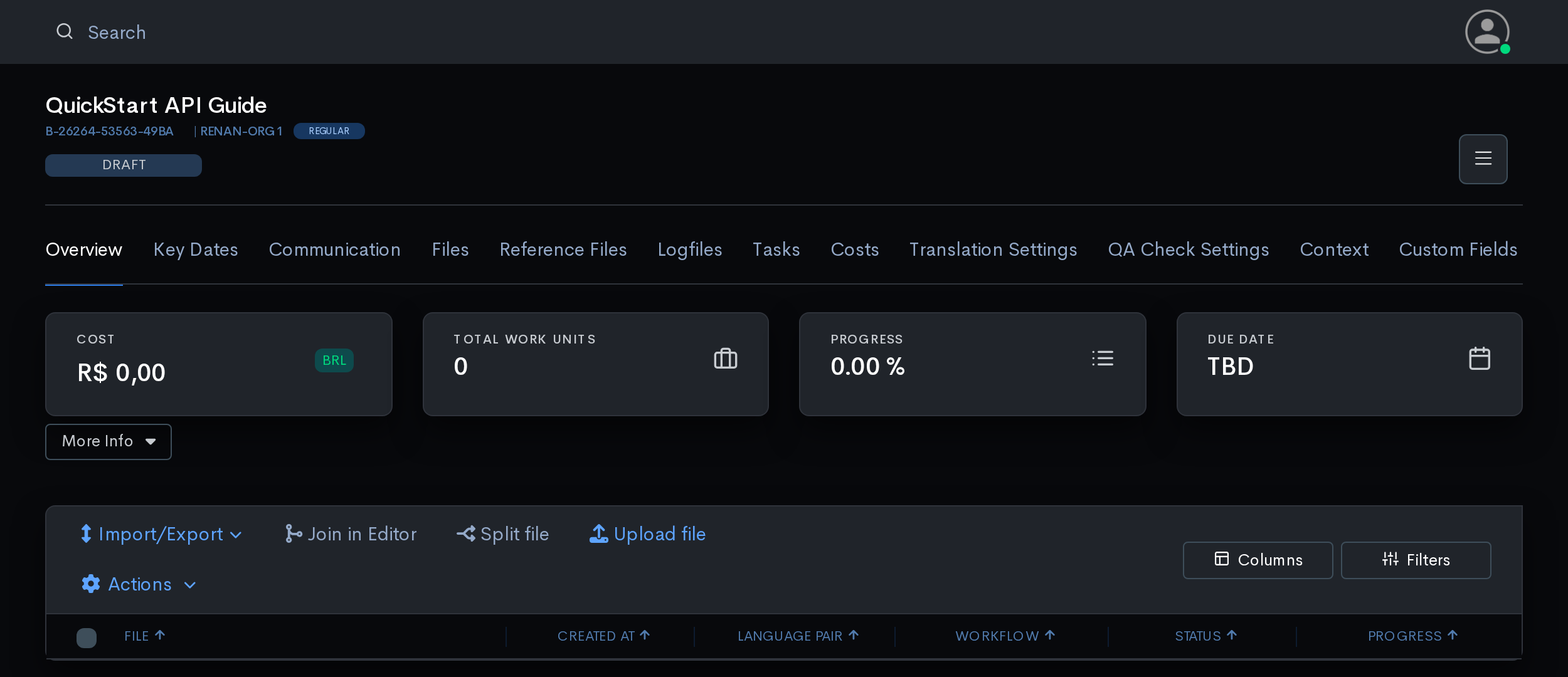
inferDefaultSettings=truefills the gaps from the org unit: currency, price list, automation. It also replaces values you sent with the org unit's. If a field has to be exactly what you passed, set it afterwards withPOST /api/v3/project/{uuid}/info.
Step 3 · Upload a file
Uploading takes two calls: first you tell the project a file is coming, then you send the file itself. The API calls the file a resource.
RESOURCE=$(curl -sS -X POST "$WXRKS_HOST/api/v3/project/$PROJECT/resource" \
  -H "X-AUTH-TOKEN: $WXRKS_TOKEN" -H 'Content-Type: application/json' \
  -d '{"name":"demo.txt","path":"/"}' \
  | python3 -c 'import sys,json; print(json.load(sys.stdin)["uuid"])')

curl -sS -X PUT \
  "$WXRKS_HOST/api/v3/project/$PROJECT/resource/$RESOURCE/content" \
  -H "X-AUTH-TOKEN: $WXRKS_TOKEN" -F "file=@demo.txt"
resource = s.post(f"{host}/api/v3/project/{project_uuid}/resource",
json={"name": "demo.txt", "path": "/"}).json()
with open("demo.txt", "rb") as fh:
s.put(f"{host}/api/v3/project/{project_uuid}"
f"/resource/{resource['uuid']}/content",
files={"file": fh}, timeout=1800).raise_for_status()Reference: POST /api/v3/project/{uuid}/resource · PUT /api/v3/project/{uuid}/resource/{uuid}/content
Learn more: File parsing options
| Field | What it is |
|---|---|
name | The filename. Its extension decides which parser is used. |
path | Folder inside the project, / for the root. Use it to mirror a source tree. |
notes | Free text shown to whoever opens the file. |
file | The file itself, attached to the second call as a file upload. |
The first call tells you how the platform will read the file: parserFilter: "plaintext" here, chosen from the extension. If that is wrong for your file, fix it with POST /project/{uuid}/resource/{uuid}/file-params before sending the contents.
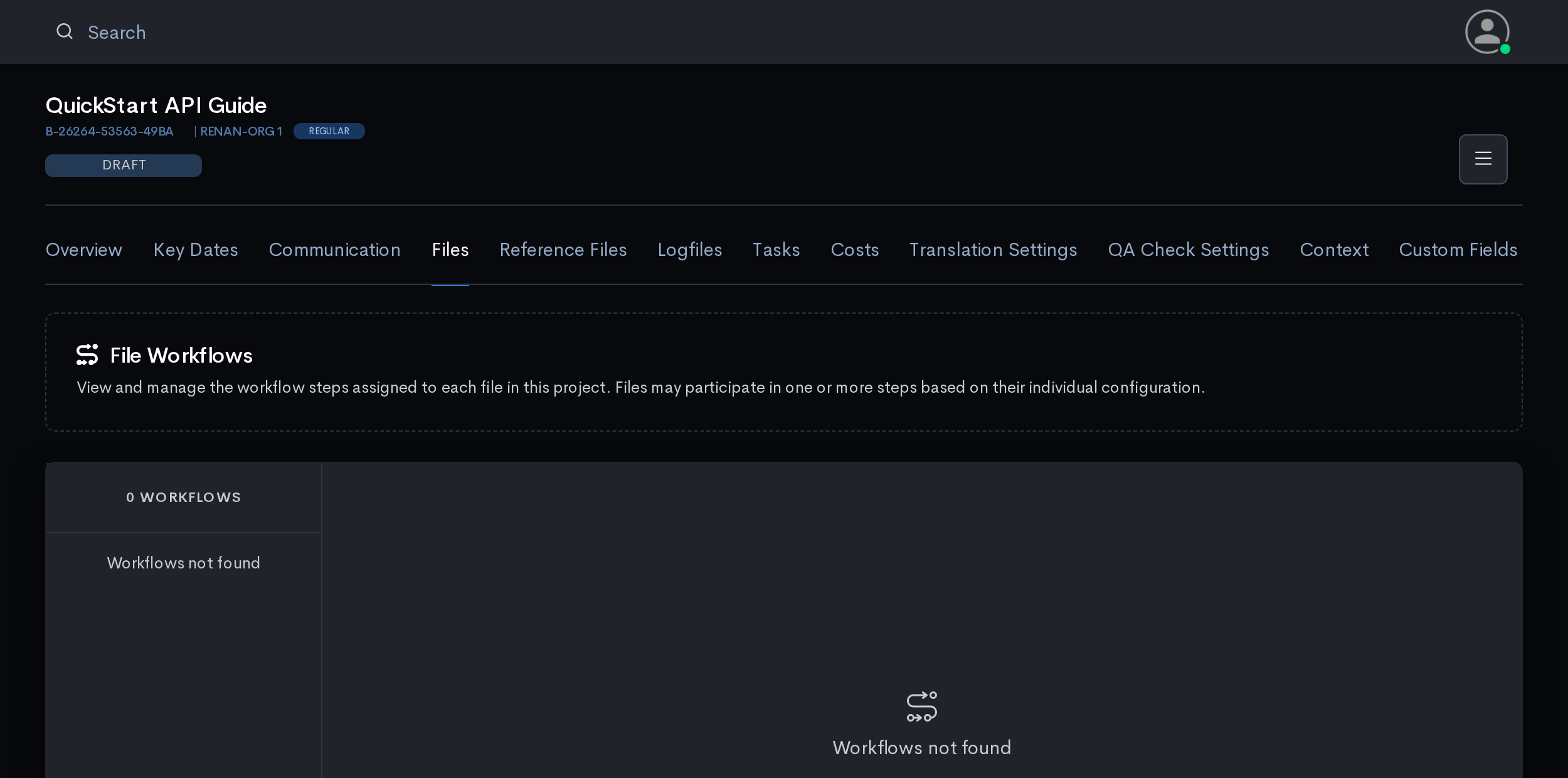
The second call answers with an empty body when it works. Allow plenty of time for it: this is the only call that carries the whole file, which can be hundreds of megabytes. A short timeout here is the most common cause of "it worked, and then it didn't".
A ZIP is not unpacked on upload. It stays one resource. To add the files inside it, call
POST /api/v3/project/{uuid}/resource/{uuid}/zipand follow the task it returns withGET .../zip/status/{taskId}until it isCOMPLETED, then create work units for the resources it lists.
Step 4 · Create work units
You do not create work units one by one. You say which file, which steps and which languages, and the platform creates every combination.
curl -sS -X POST "$WXRKS_HOST/api/v3/project/$PROJECT/work-unit?bulk=true" \
  -H "X-AUTH-TOKEN: $WXRKS_TOKEN" -H 'Content-Type: application/json' \
  -d "[{
    \"projectResourceUuid\": \"$RESOURCE\",
    \"workflows\": [\"TRANSLATION\", \"PROOFREADING\"],
    \"targetLocales\": [\"pt_br\", \"es_es\"]
  }]"
work_units = s.post(f"{host}/api/v3/project/{project_uuid}/work-unit",
params={"bulk": "true"},
json=[{"projectResourceUuid": resource["uuid"],
"workflows": ["TRANSLATION", "PROOFREADING"],
"targetLocales": ["pt_br", "es_es"]}]).json()Reference: POST /api/v3/project/{uuid}/work-unit?bulk=true
Learn more: Understanding steps in workflows · Managing your custom workflows · Split a work unit into parts
| Field | What it is |
|---|---|
projectResourceUuid | Which uploaded file these work units are for. |
workflows | The steps this file goes through: TRANSLATION, PROOFREADING, REVIEW, DTP, QA and others. GET /api/v3/workflow lists the ones your account has enabled. |
targetLocales | The languages to produce, as xx_yy. |
?bulk=true | Required. Without it this same path searches work units (step 9). |
2 workflows × 2 locales = 4 work units:
| # | sequence | workflow | targetLanguage |
|---|---|---|---|
| 1 | 1 | TRANSLATION | pt_br |
| 2 | 2 | PROOFREADING | pt_br |
| 3 | 1 | TRANSLATION | es_es |
| 4 | 2 | PROOFREADING | es_es |
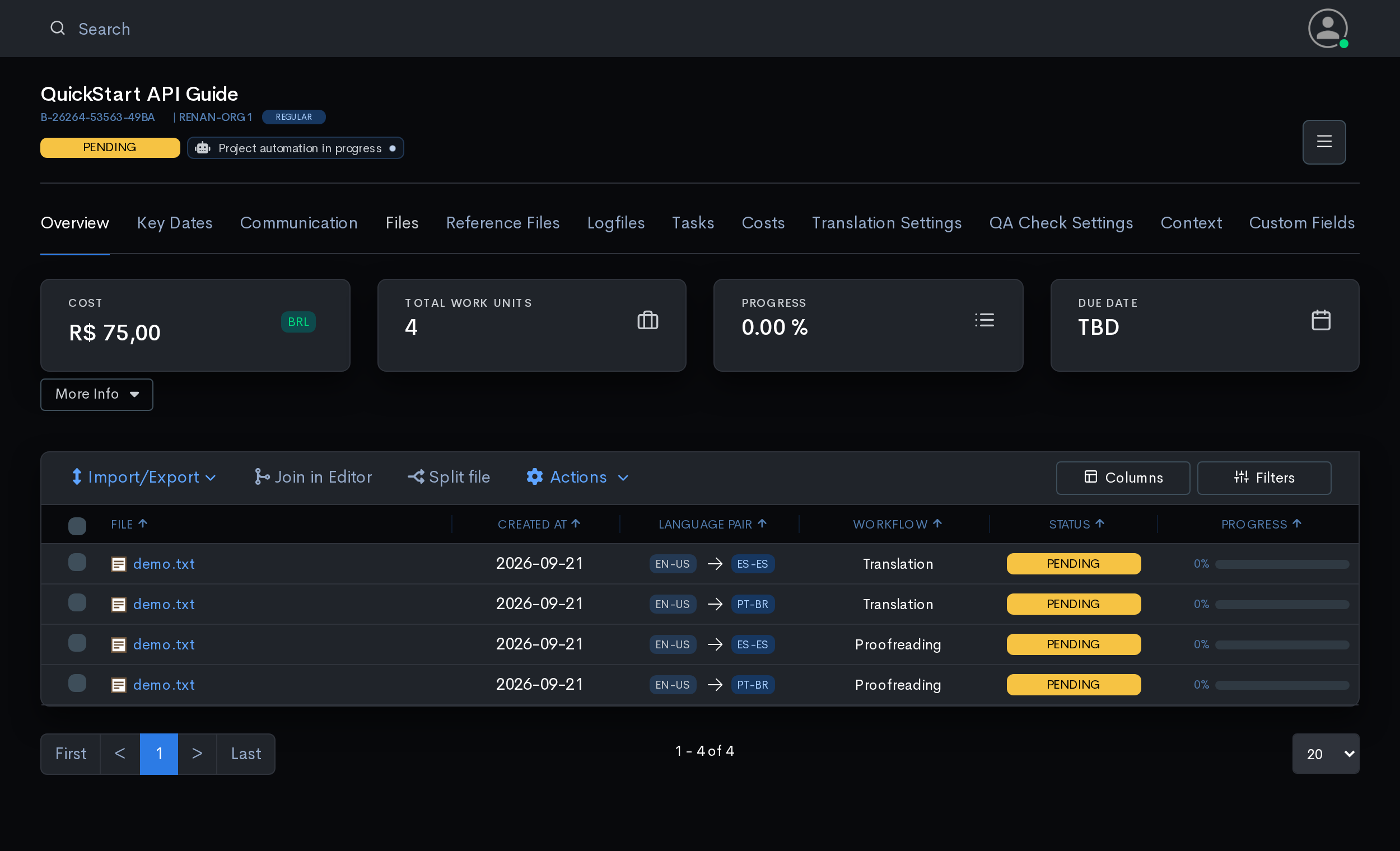
Each one carries a sequence: its workflow level. Translation is 1, proofreading is 2.
Keep these numbers. List Project Work Units leaves sequence out; this reply and the search in step 9 carry it. You need them in steps 7 to 10.
The badge beside the status is Quote Automation quoting the project and moving it DRAFT → PENDING on its own; step 6 explains it.
Step 5 · Wait for the file to be prepared
STATUS_URL="$WXRKS_HOST/api/v3/project/$PROJECT/ingestion/status"
until [ "$(curl -sS -H "X-AUTH-TOKEN: $WXRKS_TOKEN" "$STATUS_URL")" = '"COMPLETED"' ]; do
  sleep 3
done
import time
while True:
st = s.get(f"{host}/api/v3/project/{project_uuid}"
f"/ingestion/status").text.strip().strip('"')
if st in ("COMPLETED", "COMPLETED_WARN"):
break
time.sleep(3)Reference: GET /api/v3/project/{uuid}/ingestion/status
The platform splits the file into segments before anyone can work on it. Usually a few seconds.
Only start checking after step 4. Until the work units exist, this call succeeds but answers with nothing at all, so a loop waiting for
"COMPLETED"right after the upload waits forever.The answer is the word with quotation marks around it,
"COMPLETED", not an object. Strip the quotes before comparing."COMPLETED_WARN"also means the file is ready.
Step 6 · Approve
What this step does depends on the org unit's Quote Automation:
| Quote Automation | After step 4 the project is | This step |
|---|---|---|
| ON | already PENDING, already quoted | just PENDING → APPROVED |
| OFF | still DRAFT | your DRAFT → PENDING runs the quote, then APPROVED |
Either way the safe move is the same: ask the project what status it is in, and act on the answer rather than on what you expect.
STATUS=$(curl -sS -H "X-AUTH-TOKEN: $WXRKS_TOKEN" \
  "$WXRKS_HOST/api/v3/project/$PROJECT" \
  | python3 -c 'import sys,json; print(json.load(sys.stdin)["status"])')

if [ "$STATUS" = "DRAFT" ]; then
  curl -sS -X POST "$WXRKS_HOST/api/v3/project/$PROJECT/status" \
    -H "X-AUTH-TOKEN: $WXRKS_TOKEN" -H 'Content-Type: application/json' \
    -d '{"newStatus":"PENDING","calculateCosts":true}'
fi

curl -sS -X POST "$WXRKS_HOST/api/v3/project/$PROJECT/status" \
  -H "X-AUTH-TOKEN: $WXRKS_TOKEN" -H 'Content-Type: application/json' \
  -d '{"newStatus":"APPROVED"}'
def ensure_status(target, **body):
current = s.get(f"{host}/api/v3/project/{project_uuid}").json()["status"]
if current == target:
return
r = s.post(f"{host}/api/v3/project/{project_uuid}/status",
json={"newStatus": target, **body})
if r.status_code == 422:
return # already there, or automation is mid-flight
r.raise_for_status()
ensure_status("PENDING", calculateCosts=True)
ensure_status("APPROVED")Reference: GET /api/v3/project/{uuid} · POST /api/v3/project/{uuid}/status
Learn more: How to use wxrks Quote Automation · Project costs
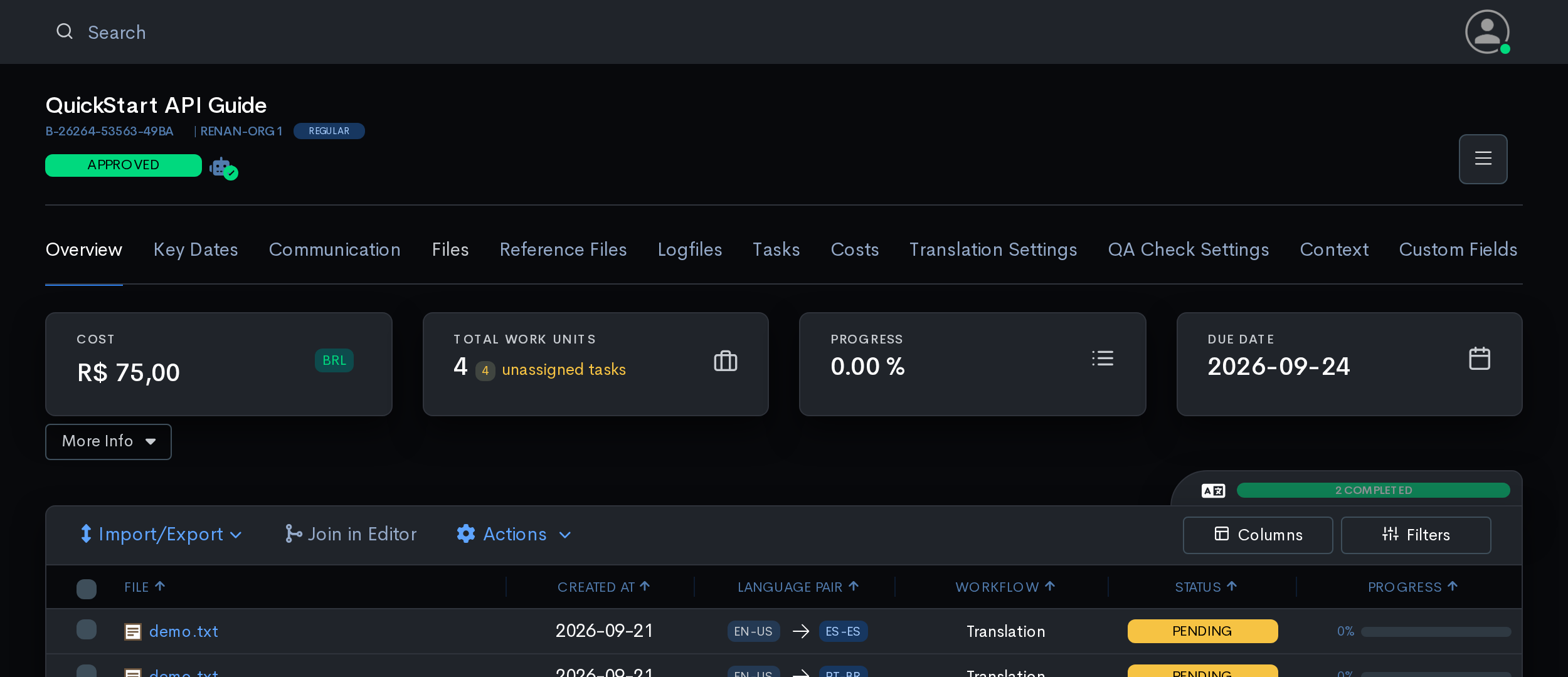
Two errors here are not really errors. Both mean "the platform is doing it for you; wait a moment and look again":
Project can't change to PENDING during some running process: still workingUnsupported transition: Pending -> Pending: already finishedTreat both as success and carry on: read the status again in a few seconds and you will find the project where you wanted it.
Step 7 · Wait for pre-translation
Approving the project is what starts pre-translation. The platform fills in what it can from your translation memories, machine translation and glossaries; you do not make a separate call for it.
curl -sS -H "X-AUTH-TOKEN: $WXRKS_TOKEN" \
  "$WXRKS_HOST/api/v3/project/$PROJECT/process-summary"
summary = s.get(f"{host}/api/v3/project/{project_uuid}"
f"/process-summary").json()
counts = {row["status"]: row["count"] for row in summary}
done = not counts.get("TRANSLATING", 0) and counts.get("TRANSLATED", 0) >= 2Reference: GET /api/v3/project/{uuid}/process-summary
Checking every few seconds, you will see:
[{"status":"CONTENT_READY","count":4}]

[{"status":"CONTENT_READY","count":2},
 {"status":"TRANSLATED","count":1},
 {"status":"TRANSLATING","count":1}]

[{"status":"CONTENT_READY","count":2},
 {"status":"TRANSLATED","count":2}]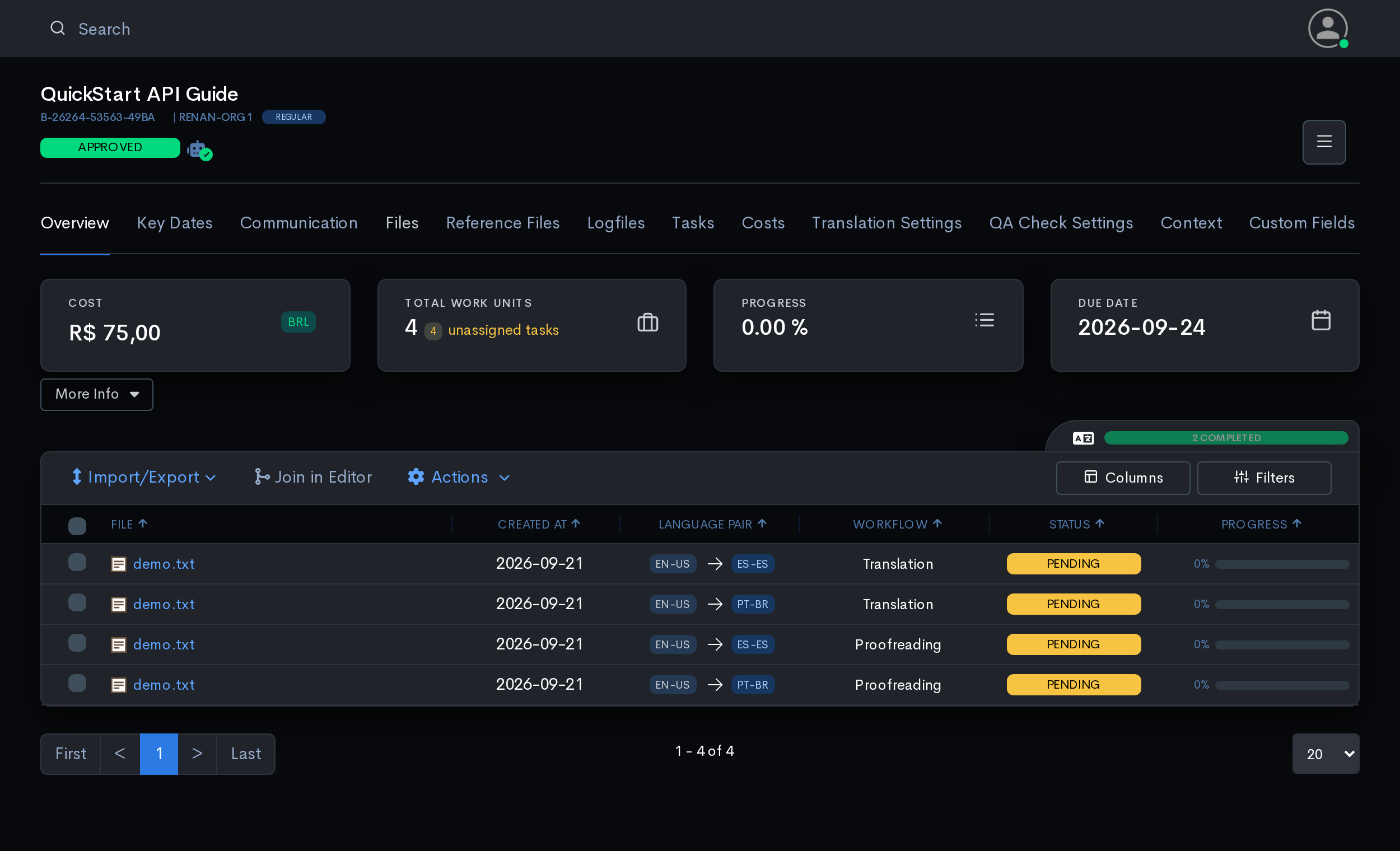
It stops with two still at CONTENT_READY, and that is not a problem. Only level 1 gets pre-translated. The proofreading pair is waiting for a person to finish the translation first, exactly as it should.
So the test for "pre-translation finished" is whether TRANSLATED matches the number of level-1 work units: the ones with sequence: 1.
Step 8 · Assign the tasks
Approving the project turned each work unit into a task. A task is what you hand to a person, and they are created for you: you only decide who gets them.
curl -sS -H "X-AUTH-TOKEN: $WXRKS_TOKEN" \
  "$WXRKS_HOST/api/v3/task?projectUuid=$PROJECT&size=100"

# TASK is a task's uuid from that list; ASSIGNEE the uuid of the person who gets it.
curl -sS -X POST \
  "$WXRKS_HOST/api/v3/task/$TASK/assignment/$ASSIGNEE" \
  -H "X-AUTH-TOKEN: $WXRKS_TOKEN"
data = s.get(f"{host}/api/v3/task",
params={"projectUuid": project_uuid, "size": 100}).json()
tasks = data.get("content", data)
level1 = [t for t in tasks if t["sequence"] == 1 and t["status"] == "PENDING"]
for t in level1:
s.post(f"{host}/api/v3/task/{t['uuid']}/assignment/{assignee_uuid}")Reference: GET /api/v3/task · POST /api/v3/task/{uuid}/assignment/{uuid} · POST /api/v3/task/assignment?bulk=true
Learn more: Assigning tasks to users · Task assignment eligibility rules
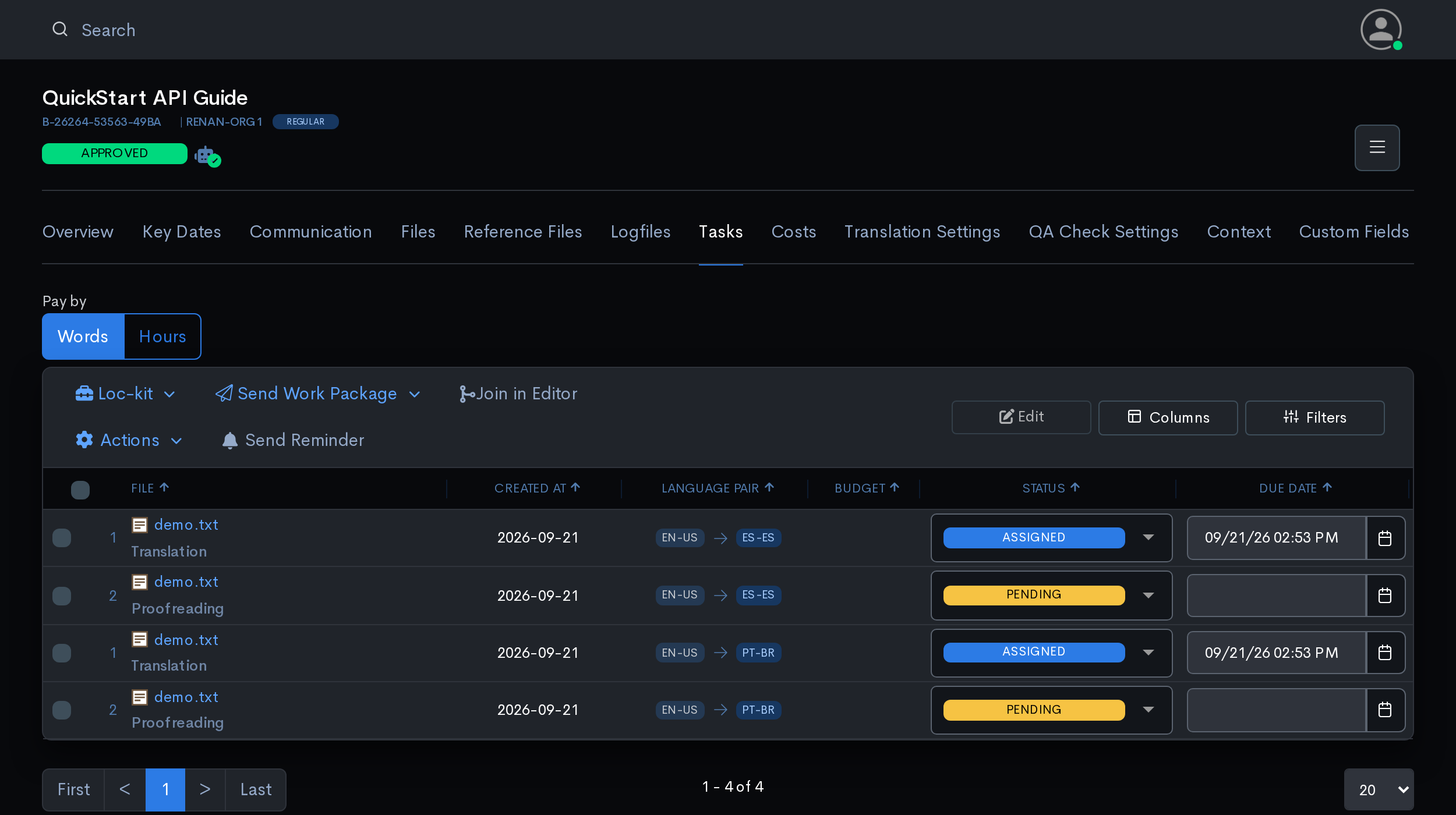
The number beside each file is the workflow level. Level 1 is ASSIGNED; level 2 stays PENDING until level 1 is delivered.
Task statuses: PENDING → ASSIGNED → DELIVERED. Also CANCELLED, PENDING_ACCEPTANCE, PENDING_CONFIRMATION, SCHEDULED, EXPIRED, INVOICED, SKIPPED.
Find eligible people by language pair:
curl -sS -H "X-AUTH-TOKEN: $WXRKS_TOKEN" --get \
  --data "sourceLanguage=en_us&targetLanguages=pt_br&status=ACTIVE" \
  "$WXRKS_HOST/api/v3/user"
users = s.get(f"{host}/api/v3/user",
params={"sourceLanguage": "en_us",
"targetLanguages": "pt_br",
"status": "ACTIVE"}).json()Reference: GET /api/v3/user · DELETE /api/v3/task/{uuid}/assignment
A
403here usually is not a permissions problem. It most often means the person is not set up for that language pair. Check their profile before checking your token.
Step 9 · Track progress
To see how the work is going, search the project's work units: POST to the path of step 4 with a body and no ?bulk=true. The search returns each work unit in full; List Project Work Units returns fewer fields, and Get Project Work Unit one work unit at a time.
Mind the
?bulk=true. It is the same address you used in step 4. With the parameter it creates work units; without it, it searches them.
curl -sS -X POST "$WXRKS_HOST/api/v3/project/$PROJECT/work-unit" \
  -H "X-AUTH-TOKEN: $WXRKS_TOKEN" -H 'Content-Type: application/json' -d '{}'
data = s.post(f"{host}/api/v3/project/{project_uuid}/work-unit",
json={}).json()
units = data.get("content", data)
for w in sorted(units, key=lambda x: x["sequence"]):
done, total = w["confirmedSegments"], w["totalSegments"]
who = (w.get("assignee") or {}).get("name", "unassigned")
print(f"L{w['sequence']} {w['workflow']:<14} {done}/{total} {who}")Reference: POST /api/v3/project/{uuid}/work-unit, without bulk
It returns what the list leaves out:
{
  "sequence": 1,
  "workflow": "TRANSLATION",
  "taskStatus": "ASSIGNED",
  "assignee": { "name": "Ana Souza" },
  "totalSegments": 3,
  "confirmedSegments": 0,
  "words": 21,
  "cost": 26.00
}
confirmedSegments out of totalSegments is the number to watch. It tells you how much of the text a person has actually confirmed, which is the truest measure of progress. (workStatus tracks a different thing and updates on its own schedule.)
| Question | Endpoint |
|---|---|
| Is pre-translation done? | GET /process-summary |
| How far along is the work? | POST /work-unit → confirmedSegments |
| Who is on what? | GET /task?projectUuid=… → status, assignee |
Steps 8 and 9 repeat per level, lowest first:
assign  →  people work in the editor  →  segments confirmed
        →  task delivered  →  next level becomes workable
Step 10 · Deliver
Delivering the project closes it. Work that has started is kept; work that never began is dropped. The rule is applied to each task on its own:
| Task state when the project is delivered | Becomes |
|---|---|
| Assigned, ≥1 segment confirmed | DELIVERED: partial work kept |
| Assigned, nothing confirmed | CANCELLED |
| Not assigned | CANCELLED |
curl -sS -X POST "$WXRKS_HOST/api/v3/project/$PROJECT/status" \
  -H "X-AUTH-TOKEN: $WXRKS_TOKEN" -H 'Content-Type: application/json' \
  -d '{"newStatus":"DELIVERED"}'
keep = [w for w in units
if w["confirmedSegments"] > 0 and w.get("assignee")]
drop = [w for w in units if w not in keep]
print(f"{len(keep)} kept, {len(drop)} will be cancelled")
s.post(f"{host}/api/v3/project/{project_uuid}/status",
json={"newStatus": "DELIVERED"})Reference: POST /api/v3/project/{uuid}/status
It is one-way
{
  "status": 422,
  "code": "BWX-002",
  "message": "BW Error: Unsupported transition: Delivered -> Approved"
}
DELIVEREDmoves on to invoicing, and that is the only way forward: a delivered project stays delivered, and so do the tasks that were closed with it.Delivering is a decision you make, not a check the platform runs for you. Look at the confirmed-segment counts from step 9 before you call it.
Most of the time you never make this call: once the last workflow level is handed over, the platform delivers the project itself.
Step 11 · Download
curl -sS -H "X-AUTH-TOKEN: $WXRKS_TOKEN" \
  "$WXRKS_HOST/api/v3/project/$PROJECT/download" -o translations.zip
data = s.get(f"{host}/api/v3/project/{project_uuid}/download").content
open("translations.zip", "wb").write(data)Reference: GET /api/v3/project/{uuid}/download
translations.zip
├── es_es/demo.txt
└── pt_br/demo.txt
This is the direct route: one call, one ZIP, one folder per language. It suits a script and a project of ordinary size.
The platform also offers other ways out: a background job for large projects (Request Project Translated Files), a package with a link you can send to someone, a single file on its own. Bilingual file round trip covers the job route.
Stop polling, use webhooks
Everything above that waits in a loop has an event:
| Event | Fires when |
|---|---|
PROJECT_INGESTION_COMPLETED | Files parsed: step 5 |
PROJECT_TRANSLATION_FINISHED | Pre-translation done: step 7 |
TASK_ASSIGNED | A task got an assignee: step 8 |
TASK_STATUS_CHANGE | A task moved: a level was delivered |
PROJECT_STATUS_CHANGE | DELIVERED: download now |
curl -sS -X POST "$WXRKS_HOST/api/v3/webhook" \
  -H "X-AUTH-TOKEN: $WXRKS_TOKEN" -H 'Content-Type: application/json' \
  -d '{
    "url": "https://your-app.example.com/hooks/wxrks",
    "type": "PROJECT_TRANSLATION_FINISHED",
    "secret": "<a long random value>"
  }'
s.post(f"{host}/api/v3/webhook", json={
"url": "https://your-app.example.com/hooks/wxrks",
"type": "PROJECT_TRANSLATION_FINISHED",
"secret": os.environ["WXRKS_WEBHOOK_SECRET"],
})Reference: POST /api/v3/webhook
Your endpoint must answer with a 2xx status within 3 seconds, starting with the validation request wxrks sends when you create the webhook. Acknowledge first, process after.
Every request carries X-BWX-Event-ID (retries keep it, so deduplicate on it) and X-BWX-Webhook-ID. With a secret, every request is also signed in X-BWX-Signature: Webhooks shows how to verify it and lists what each event carries.